SCAM ALERT: Your computer was hacked!
DATE: 2/27/2026
EMAIL SUBJECT: Your computer was hacked!
COMMUNICATION CHANNEL: Email
SENDER: John Blue
Phishing Message
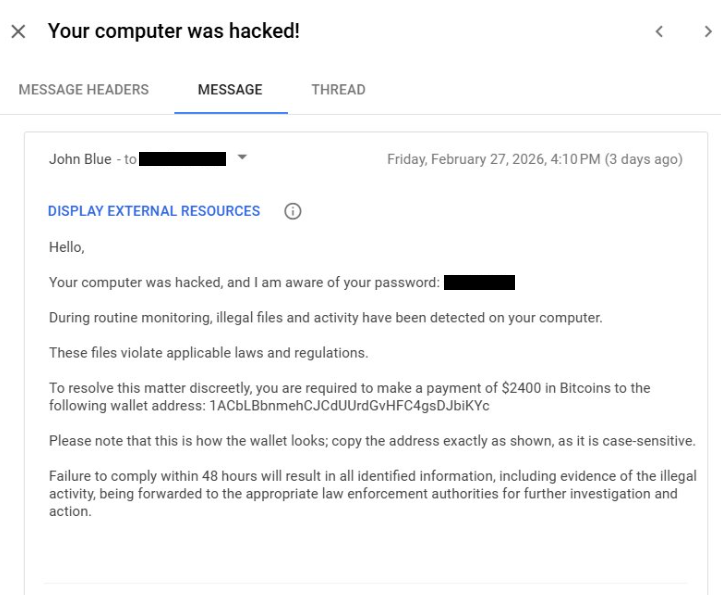

Please see below to read the full text of the message.
Message Text & Red Flags
Message Text
DISPLAY EXTERNAL RESOURCES
Hello, Your computer was hacked, and I am aware of your password: XXXXXXXX
During routine monitoring, illegal files and activity have been detected on your computer.
These files violate applicable laws and regulations.
To resolve this matter discreetly, you are required o make a payment of $2400 in Bitcoins to the following wallet address: 1ACbLBbnmehCJCdUUrdGvHFC4gsDjbiKYc
Please note that this is how the wallet looks; copy the address exactly as shown, as it is case-sensitive.
Failure to comply within 48 hours will result in all identified information, including evidence of the illegal activity, being forwarded to the appropriate law enforcement authorities for further investigation and action.
Red Flags
🚩 The email includes a password you likely recognize. Scammers pull these from publicly available data breaches (like old LinkedIn or Yahoo leaks) and pair them with your email address to make the "hack" seem real. If you see an old password, it means that specific account was breached years ago—not that your current computer is compromised.
🚩 It requires Bitcoin payment. Legitimate law enforcement, university IT, or government agencies will never demand payment via cryptocurrency. Bitcoin is the preferred currency of scammers because it is decentralized, making it nearly impossible to reverse the transaction or track the recipient once the money is sent.
🚩 It offers discreet resolution. Real legal or disciplinary actions are never "resolved discreetly" for a flat fee. The claim that they will "ignore" illegal activity in exchange for money is a classic hallmark of extortion, not a legitimate legal process.
🚩 Scammers use high-pressure tactics to bypass your critical thinking. By giving you a short window (48 hours), they hope you will act out of fear before you have a chance to report the email to IT or verify the claims.
If you received this email, do not engage with the email— do not reply, download attachments, or click on links. Please forward the email to IT Central at ITCentral@newschool.edu to report the phishing scam and then delete the email from your inbox.
Return to Phish Bowl