Invoices - Screen Overview
Invoices
Screen Code: arlinvi
This screen assists you to view all the invoices for the customer and generate a new invoice. You can view the details by searching for an invoice number.
Navigation Tip: Account Receivable >> Service Accounts >> Right-click to select Invoices.

It has the following parameters:
Field
|
Description
|
Invoice Number
|
Invoice number for the Customer
|
Type
|
Invoice type - (For example, one time, annual, monthly)
|
Status
|
Active - Bill this invoice.
Complete - The invoice is completed and will not be billed. This is the only status that is allowed for invoice types Monthly, Quarterly, semi-annual, and Annual.
Hold - The invoice is on hold, it will not be billed.
|
First Invoice
|
The date on which the first invoice was generated for the customer
|
Last Invoice
|
The date on which the last invoice was generated for the customer
|
Current Invoice
|
Current invoice number for payment
|
Current Due Amount
|
The most up-to-date due amount. After the Bill Date, any changes to the account are reflected in the current balance.
|
Invoice Balance
|
The amount owed for an invoice. An invoice balance can be positive or negative.
|
Current Due Date
|
Date by which the payment is to be paid.
|
Paid
|
Payment status indicator - Green legend with Yes indicates payment made and No indicates the payment not made.
|
Right-click any invoice entries to perform the following actions:
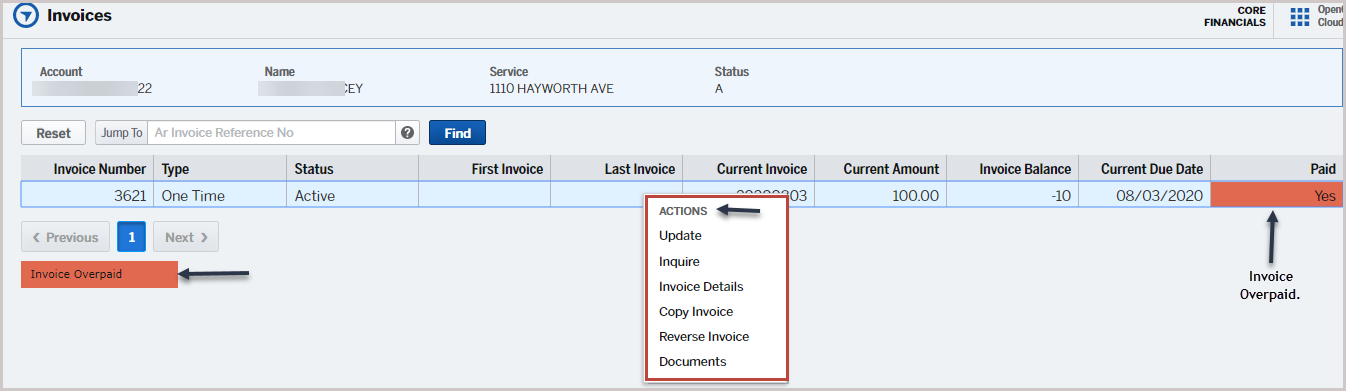
Right-click actions with links:
Actions
|
Description
|
Inquire
|
To view and update the invoices.
|
Update
|
To update the invoice.
|
Invoice Details
| To view the invoice details |
Copy Invoice
|
To copy the invoice.
|
Reverse Invoice |
To reverse the invoice.
|
View AR Invoice Documents |
View documents related to the transactions.
|
Version 1.1

